The Ultimate USB Adapter for Classic Mattel Intellivision Controllers
The iCode Duo Ultimate SE H1-INT is a premium USB game controller adapter purpose-built for classic Intellivision enthusiasts. Powered by the dual-core RP2350 microcontroller, it delivers precise, low-latency translation of your original Intellivision controllers into standard USB HID input — compatible with Windows and Linux PCs, Macs, iOS devices, Android, MiSTer FPGA, Nintendo Switch, Steam Deck, single-board computers running emulation systems like RetroPie, Batocera, EmuELEC, or any Linux-based frontend with RetroArch backends, and virtually any platform. No drivers or software required. Just plug in your favorite Intellivision controller and play.
The Intellivision Hand Controller’s distinctive 16-position directional disc is captured with precise output across all 16 discrete positions mapped around a full 360-degree circle, and can also function as an 8-way D-Pad to match what your game or emulator expects. Intellivision games lean heavily on the controller’s 12-key keypad — for weapon selection, game options, and number entry — and the Duo Ultimate SE H1-INT gives you complete control over every key, individually mappable to any gamepad button, directional action, or keyboard key.
Without an on-device screen, the SE uses two RGB status LEDs to show your configuration at a glance — LED 1 reflects your active USB emulation mode by color, while LED 2 reflects connection status. A built-in power switch toggles the adapter on and off without unplugging USB.
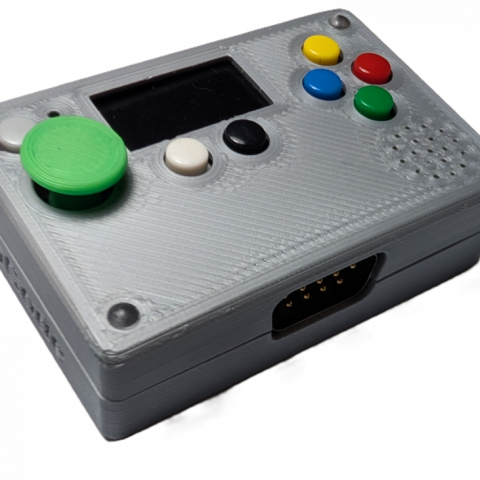
The device itself features 2 configurable buttons that can be mapped to any gamepad function — start, select, triggers, shoulder buttons, or any action you need. Each button supports up to 3 simultaneous functions that can target either port, and the same multi-function capability extends to the controller’s side fire buttons, giving you powerful macro-like flexibility without any software. On-device combo shortcuts let you cycle USB emulation modes without touching a menu, while the iCodeHub companion app handles deeper configuration via WebHID — all without installing any software.
Key Features
- Supported Controllers — Mattel Intellivision Hand Controller, including the 16-position directional disc, all three side fire buttons, and the full 12-key keypad — see Supported Controllers section below for full details
- Dual-Core RP2350 Processor — powerful microcontroller delivers fast polling, precise timing, and smooth multitasking across input scanning and USB output
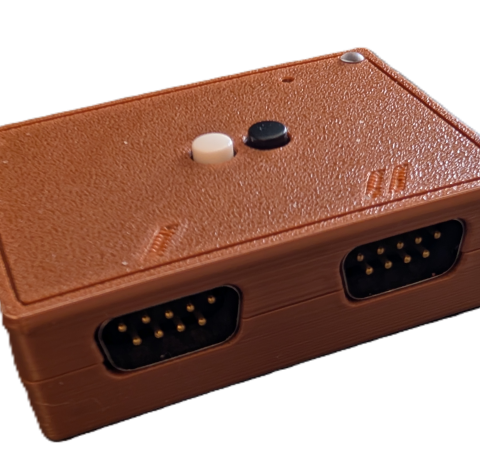
- Dual DB9 Ports — connect two controllers simultaneously for 2-player games, with fully independent device and mapping configurations per port
- 16-Position Directional Disc — precise output across all 16 discrete positions mapped around a full 360-degree circle, with the option to function as an 8-way D-Pad to match your game or emulator
- Full Keypad Support — every key on the Intellivision 12-key keypad (1-9, Clear, 0, Enter) is individually mappable to any gamepad button, directional action, or keyboard key — essential for the many Intellivision titles that rely on keypad input for weapon selection, game options, and number entry
- Three Configurable Fire Buttons — all three side fire buttons are fully mappable; Fire 1 and Fire 2 support multi-action mapping with rapid fire, while Fire 3 provides single-action mapping
- Programmable Device Buttons — 2 buttons on the adapter itself, each mappable to any gamepad function (start, select, triggers, shoulders, or any action) with up to 3 simultaneous functions per button
- Multi-Function Fire Buttons — the controller’s side fire buttons also support up to 3 mapped functions each for powerful macro-like control without software
- Five USB Emulation Modes — Standard, Classic, Nintendo, Legacy, and iOS for broad compatibility across platforms and emulators
- LED Status Indicators — two on-device RGB LEDs provide at-a-glance feedback: LED 1 shows your active USB emulation mode by color, LED 2 shows connection status, so you always know your configuration without a screen
- Startup Emulation Mode Switching — hold BLACK while plugging in to cycle through USB emulation modes; no app or menu needed
- Power On/Off Switch — built-in switch lets you toggle the adapter on and off without unplugging the USB cable
- Over-the-Air Firmware Updates — update firmware directly through iCodeHub with full version history, release notes, and built-in recovery mode
- Device Registration & Transfer — your adapter is linked to your account with seamless ownership transfer when gifted or sold
- Direction-to-Action Mapping — remap disc directions to buttons or vice versa for creative control schemes
- Configurable Rapid Fire — per-button auto-fire with adjustable speed
- SBC & Emulation Compatible — works seamlessly with RetroPie, Batocera, EmuELEC, and any Linux-based emulation frontend with RetroArch or standalone emulator backends
- iCodeHub Companion App — free web-based configuration and firmware updates via WebHID in Chrome or Edge — no software installation required
- Passwordless Sign-In — Google OAuth or one-time email/phone code, no password to manage
- USB Firmware Updates — simple firmware flashing via iCodeHub or BOOTSEL mode for future feature updates
- True Plug and Play — standard USB HID device, no drivers required on any platform
Supported Controllers
Mattel Intellivision Hand Controller
Full support for the Mattel Intellivision hand controller including the 16-position directional disc, all three fire buttons, and the full 12-key keypad. The disc provides precise output with 16 discrete positions mapped around a full 360-degree circle, and can also function as an 8-way D-Pad. Every keypad key (1-9, Clear, 0, Enter) can be individually mapped to any gamepad button or directional action — essential for games that rely on keypad input for weapon selection, game options, and number entry. All three side fire buttons are fully configurable — Fire 1 and Fire 2 support multi-action mapping with rapid fire, while Fire 3 provides single-action mapping.
Dual Independent Ports
The adapter’s two DB9 ports can operate independently with completely different settings and button mappings on each port. This lets two players connect at the same time, each with their own disc mapping, keypad assignments, and button configuration. Each port maintains its own configuration so every player gets the setup they prefer.
iCodeHub — Your Cloud Companion
The iCode Duo Ultimate SE H1-INT is backed by iCodeHub, a free web-based companion app that connects directly to your adapter through your Chrome or Edge browser using WebHID — no software to install, no drivers to configure.
Firmware Updates
Stay up to date with over-the-air firmware updates delivered directly through iCodeHub. Browse the full version history with release notes, download and flash new firmware right from the app, and recover from any state with the built-in firmware recovery mode — no technical knowledge required.
Device Registration & Ownership
Your adapter is registered to your account and linked to your profile. If you sell or gift your device, ownership transfers seamlessly — the new owner simply connects and claims the device on their account.
Account & Notifications
Sign in with Google or a one-time email/phone code — no password to remember. Receive in-app and email notifications about firmware updates, new features, and community events.