The Ultimate USB Adapter for Classic Atari Controllers
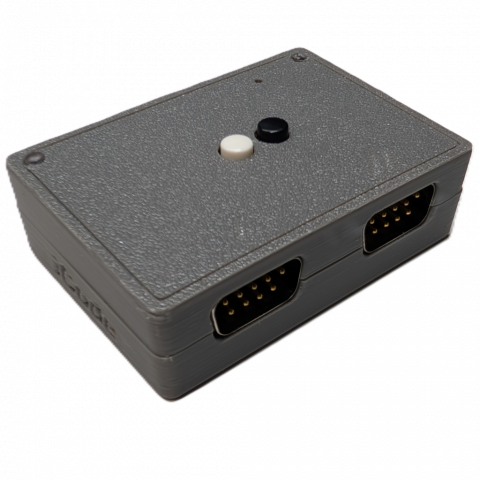
The iCode Duo Ultimate SE H1-CX is a premium USB game controller adapter purpose-built for classic Atari enthusiasts. Powered by the dual-core RP2350 microcontroller, it delivers precise, low-latency translation of your original Atari controllers into standard USB HID input — compatible with Windows and Linux PCs, Macs, iOS devices, Android, MiSTer FPGA, Nintendo Switch, Steam Deck, single-board computers running emulation systems like RetroPie, Batocera, EmuELEC, or any Linux-based frontend with RetroArch backends, and virtually any platform. No drivers or software required. Just plug in your favorite classic Atari controller and play.
At the heart of the adapter is a proprietary jitter-free analog pipeline that eliminates the noise and drift that plague other adapters. Whether you’re spinning an Atari paddle, rolling your Atari trackball, or steering with a driving controller, the Duo Ultimate SE delivers smooth, stable analog output with zero jitter — something players immediately notice and appreciate. Adjustable sensitivity and acceleration curves let you dial in exactly the feel you want, from pixel-precise aiming to fast sweeping movements.
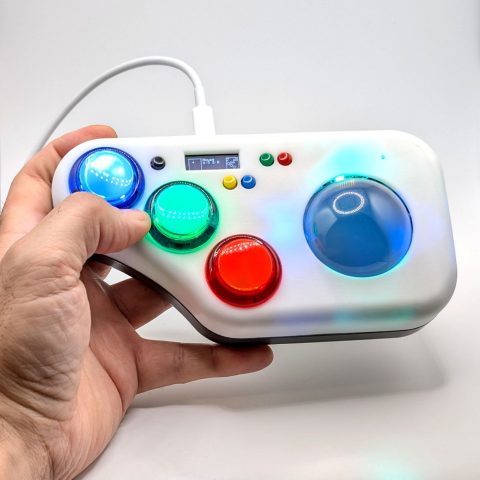
Without an on-device screen, the SE uses two RGB status LEDs to show your configuration at a glance — LED 1 reflects your active USB emulation mode by color, while LED 2 reflects your current controller type. A built-in power switch toggles the adapter on and off without unplugging USB. Auto Center turns your trackball or driving controller into a stick-style controller, unlocking classics like Asteroids, Space Invaders, Galaga, and Defender.
The device itself features 2 configurable buttons that can be mapped to any gamepad function — start, select, triggers, shoulder buttons, or any action you need. Each button supports up to 3 simultaneous functions that can target either port, and the same multi-function capability extends to your connected controller’s fire buttons, giving you powerful macro-like flexibility without any software. On-device combo shortcuts let you cycle between controller types and USB emulation modes without touching a menu, while the iCodeHub companion app handles deeper configuration via WebHID — all without installing any software.
Key Features
- Supported Controllers — Atari 2600 and 7800 Joysticks (CX40, CX78), Atari Paddles (CX-30, with 4-Player Split Mode), Atari Driving Controller (CX-20), Atari 2600 Trackball (CX-22, CX-80), and Atari 2600 Keypads (CX50, CX21) — see Supported Controllers section below for full details
- Jitter-Free Analog Pipeline — proprietary signal processing eliminates noise and drift from paddle, driving, and trackball inputs for rock-solid analog output that other adapters can’t match
- Dual-Core RP2350 Processor — powerful microcontroller delivers fast polling, precise timing, and smooth multitasking across input scanning and USB output
- Dual DB9 Ports — connect two controllers simultaneously with fully independent device and mapping configurations per port
- 4-Player Paddle Support — reads both paddles per port; iCode Exclusive Split Mode presents each paddle as a separate USB gamepad for proper multi-device detection on MiSTer, RetroPie, Batocera, RetroArch, and other platforms
- Auto Detect & Calibrate — in Auto Stick/Paddles mode, the adapter automatically detects paddle controllers and calibrates them on the fly with no manual setup
- USB Mouse Emulation — paddles, trackball, and driving controllers can operate as a USB mouse with adjustable sensitivity and acceleration for desktop use or mouse-driven games
- Dual Mode Output — trackball and other analog controllers can be configured as gamepad, mouse, or both simultaneously
- Adjustable Sensitivity & Acceleration — sensitivity controls how much physical movement is needed to travel from one position to another, while advanced acceleration dynamically responds to speed — slow movements stay precise and controlled, fast movements ramp up for quick response, giving you the best of both worlds without sacrificing accuracy
- Auto Center for Trackball & Driving — configure your trackball or driving controller as a DPad and Auto Center engages automatically: the cursor returns to neutral when the ball or wheel stops moving, exactly like an analog stick. Turn your trackball or driving controller into a stick-style controller and unlock games they were never originally meant to play, like Asteroids, Space Invaders, Galaga, and Defender. Mouse mode is unaffected, so cursor output keeps behaving like a true trackball.
- Dynamic Axis Control — choose horizontal or vertical axis orientation for trackball and driving controller, with the ability to switch dynamically during gameplay
- Programmable Device Buttons — 2 buttons on the adapter itself, each mappable to any gamepad function (start, select, triggers, shoulders, or any action) with up to 3 simultaneous functions per button
- Multi-Function Fire Buttons — connected controller fire buttons also support up to 3 mapped functions each for powerful macro-like control without software
- Five USB Emulation Modes — Standard, Classic, Nintendo, Legacy, and iOS for broad compatibility across platforms and emulators
- LED Status Indicators — two on-device RGB LEDs provide at-a-glance feedback: LED 1 shows your active USB emulation mode by color, LED 2 shows your current controller type, so you always know your configuration without a screen
- Runtime Controller Switching — hold both buttons for 2 seconds to cycle through controller types without unplugging; LED 2 confirms the change instantly
- Startup Emulation Mode Switching — hold BLACK while plugging in to cycle through USB emulation modes; no app or menu needed
- Power On/Off Switch — built-in switch lets you toggle the adapter on and off without unplugging the USB cable
- Over-the-Air Firmware Updates — update firmware directly through iCodeHub with full version history, release notes, and built-in recovery mode
- Device Registration & Transfer — your adapter is linked to your account with seamless ownership transfer when gifted or sold
- Direction-to-Action Mapping — remap stick directions to buttons or vice versa for creative control schemes
- SBC & Emulation Compatible — works seamlessly with RetroPie, Batocera, EmuELEC, and any Linux-based emulation frontend with RetroArch or standalone emulator backends
- iCodeHub Companion App — free web-based configuration and firmware updates via WebHID in Chrome or Edge — no software installation required
- Passwordless Sign-In — Google OAuth or one-time email/phone code, no password to manage
- USB Firmware Updates — simple firmware flashing via iCodeHub or BOOTSEL mode for future feature updates
- True Plug and Play — standard USB HID device, no drivers required on any platform
Supported Controllers
Atari 2600 and 7800 Joysticks (CX40, CX78)
The classic 2600 single-button joystick or the dual button 7800 Joystick. Full 8-direction support with configurable button action mapping, letting you remap stick buttons to any function for modern game compatibility.
Atari Paddles (CX-30)
Precision analog paddle support with the jitter-free pipeline for silky-smooth rotation. In Auto Stick/Paddles mode, the adapter automatically detects when paddles are connected and calibrates them on the fly — no manual setup required, just plug in and play. The adapter reads dual paddles on a single DB9 port, enabling up to 4 players across two ports. A dedicated Split Mode presents each paddle as its own independent USB gamepad — critical for platforms like MiSTer FPGA, RetroPie, Batocera, and RetroArch that require separate device enumeration for multiplayer paddle games like Warlords and Kaboom. Read more about Duo Ultimate SE’s Split technology here. Adjustable sensitivity and acceleration let each player tune their paddle response to their preference. Paddles can be mapped to any gamepad axis for full compatibility with modern emulators, or configured as a USB mouse for desktop use and mouse-driven games. Read more about Duo Ultimate SE’s Jitter Free technology here.
Atari Driving Controller (CX-20)
Continuous-rotation analog output from the Indy 500 driving controller, decoded for perfectly smooth steering. Choose between horizontal or vertical axis output to match your emulator’s expectations, and dynamically switch axis orientation during gameplay. Sensitivity control determines how much physical rotation is needed to move from one position to another — dial it down for fine steering adjustments or crank it up for fast sweeping turns. Advanced acceleration settings respond to how fast you spin the wheel: gentle turns stay precise and controlled while fast spins ramp up responsiveness, giving you the best of both worlds without sacrificing accuracy at either end. Configure the driving controller as a DPad and Auto Center engages automatically — release the wheel and the axis returns to neutral, exactly like an analog stick, unlocking any stick-driven game. The driving controller can also operate as a USB mouse, turning the wheel into a smooth scroll or cursor control for desktop and mouse-driven applications.
Atari 2600 Trackball (CX-22, CX-80)
Full X/Y analog tracking for Atari trackball controllers with independent horizontal and vertical axis control and the ability to dynamically use both axes during gameplay. Sensitivity control lets you set how much physical ball movement translates to on-screen cursor travel — less spin for large movements or more spin for pixel-precise positioning. Advanced acceleration intelligently responds to your spin speed: slow, deliberate rolls stay tight and accurate for precise aiming, while fast flicks ramp up the response for rapid movement across the screen. The result is a trackball that feels natural and responsive at any speed, just like the original hardware intended. The trackball can be configured as a USB gamepad, a USB mouse, or both simultaneously — use it as a mouse on the desktop and a gamepad in your emulator. Configure the trackball as a DPad and Auto Center engages automatically — the cursor returns to neutral the moment you stop rolling, just like an analog stick, letting you play stick-only games like Asteroids or Space Invaders with your trackball.
Atari 2600 Keyboard Controller (CX50) and Star Raiders Keypad (CX21)
Complete support for both the Atari 2600 Keyboard Controller (CX50) and the Atari 2600 Star Raiders Keypad / Video Touch Pad (CX21), including all 12 keys. Every keypad key can be individually mapped to any gamepad button, directional action, or keyboard key through the keypad mapping system — essential for games that rely on keypad input for weapon selection, game options, and number entry.
Dual Independent Ports
The adapter’s two DB9 ports can operate independently with completely different controller types, settings, and button mappings on each port. This opens up powerful configurations that aren’t possible with single-port adapters. For example, when playing Star Raiders on an Atari system, you can connect a joystick on Port 1 for ship control while simultaneously using a keypad controller on Port 2 for console commands — exactly as the original hardware intended. Each port maintains its own device type, analog settings, and button assignments.
iCodeHub — Your Cloud Companion
The iCode Duo Ultimate SE is backed by iCodeHub, a free web-based companion app that connects directly to your adapter through your Chrome or Edge browser using WebHID — no software to install, no drivers to configure.
Firmware Updates
Stay up to date with over-the-air firmware updates delivered directly through iCodeHub. Browse the full version history with release notes, download and flash new firmware right from the app, and recover from any state with the built-in firmware recovery mode — no technical knowledge required.
Device Registration & Ownership
Your adapter is registered to your account and linked to your profile. If you sell or gift your device, ownership transfers seamlessly — the new owner simply connects and claims the device on their account.
Account & Notifications
Sign in with Google or a one-time email/phone code — no password to remember. Receive in-app and email notifications about firmware updates, new features, and community events.